iXpat for Surface Mouse

Feel every click.
On your Mac.

iXpat brings the Surface Mouse's haptics to macOS, then goes further: an Action Ring under the pointer, scrolling with real momentum, force click, and a feel you can tune for every app.

v0.1.1 · macOS 14 or later · Apple Silicon and Intel · Free and open source · 2.9 MB
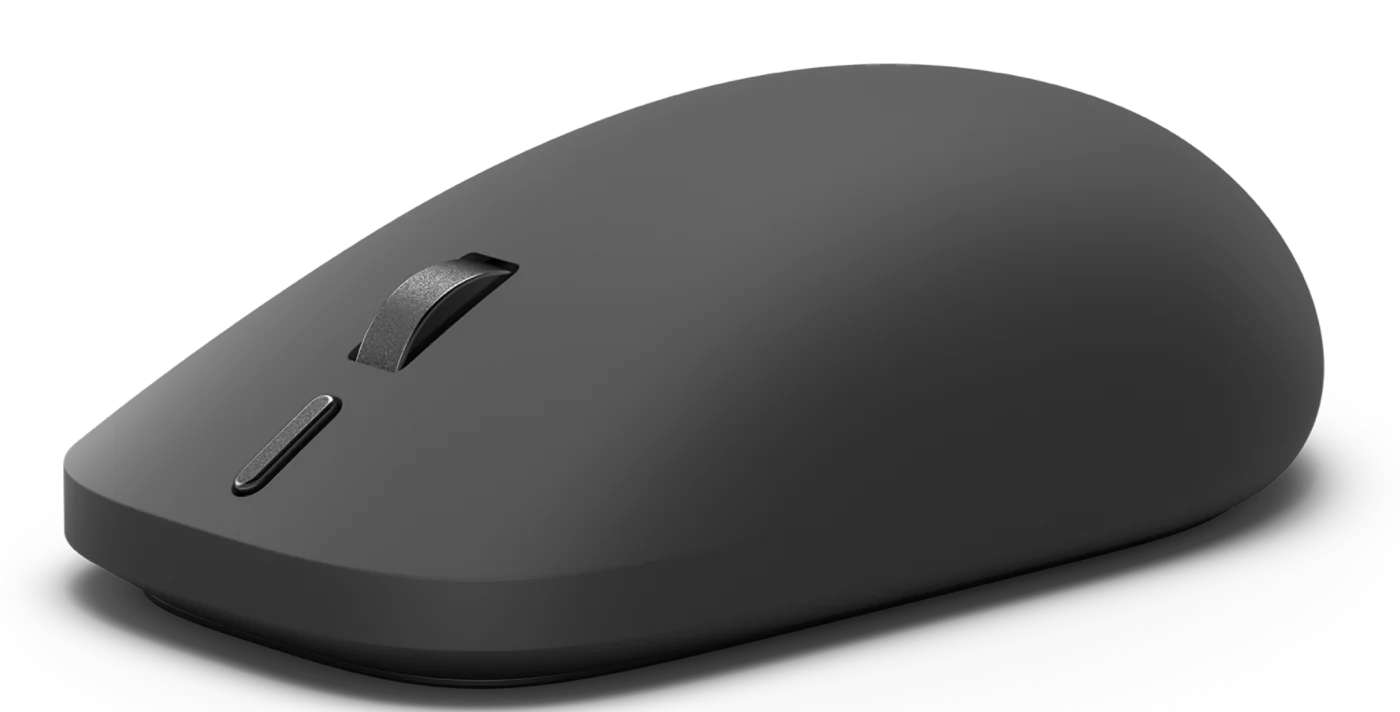
Surface Mouse (2nd Edition) in Black
Haptic engineEight waveforms, five strengths
Action buttonRemapped to anything you like
Scroll wheelRatchet, free-spin, momentum
Bluetooth 6.0Up to six months on batteriesPairs with three devicesBlack and Platinum
Product imagery courtesy of Microsoft.
The app

Every setting in one window.

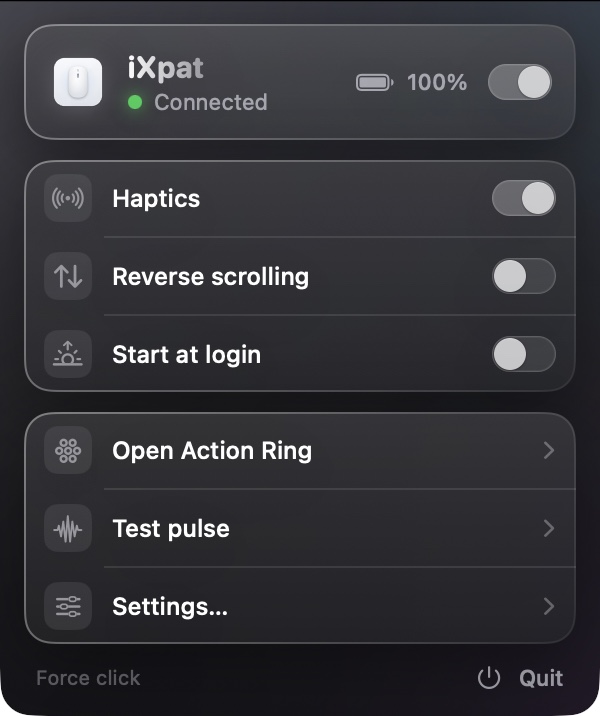
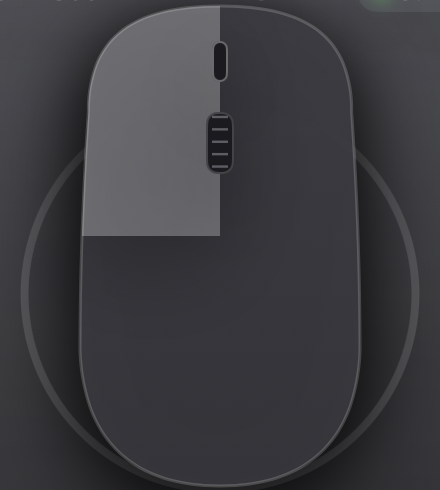
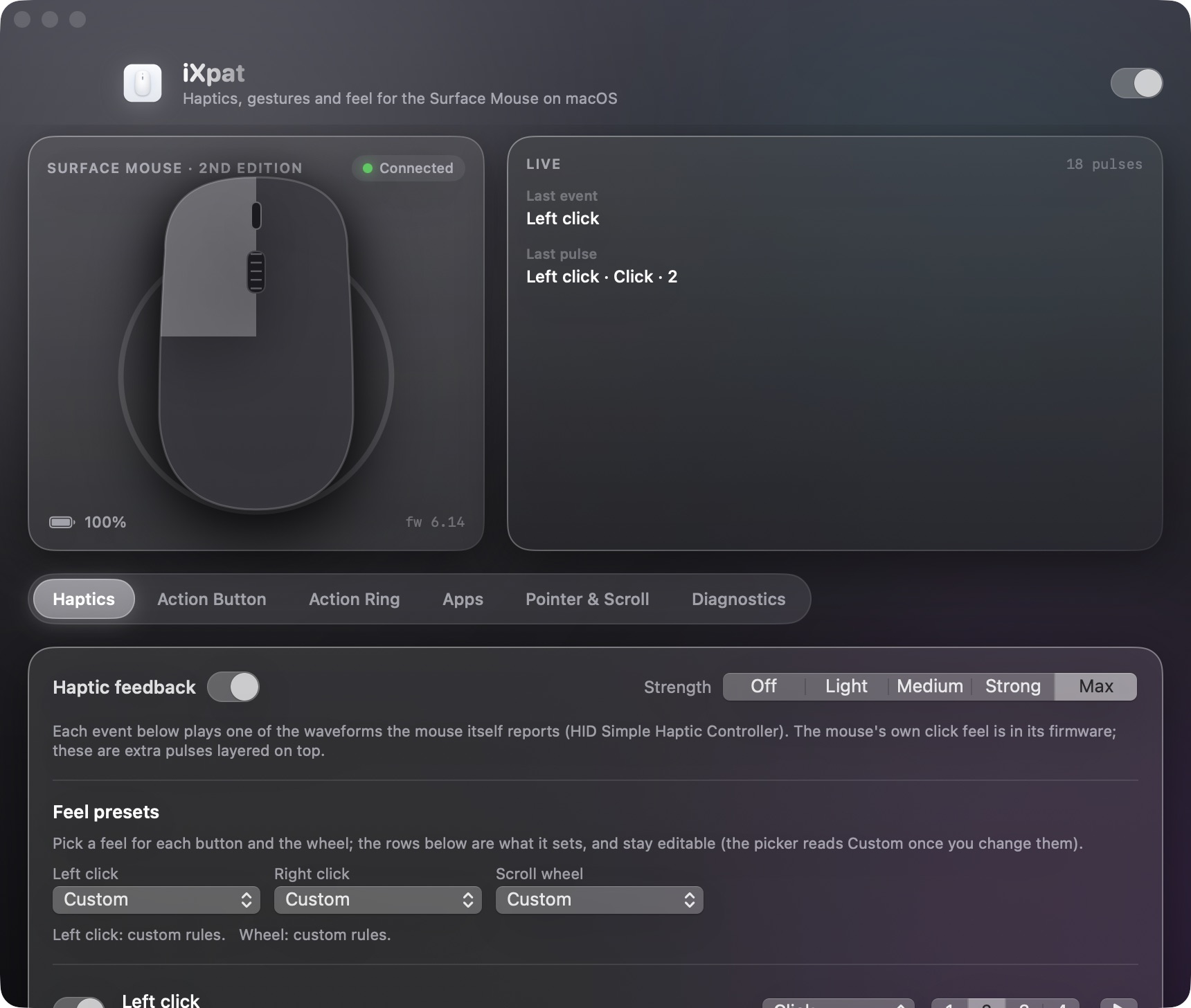
A live schematic that lights up as you click, an event monitor, and six tabs for haptics, the action button, the Action Ring, per-app profiles, pointer and scroll, and diagnostics. The menu bar popover keeps the essentials one click away.

iXpat settings window with the live mouse schematic, the event monitor and the Haptics tab
iXpat menu bar popover
Real haptics

Eight waveforms. Straight from the mouse.

The Surface Mouse carries a standard haptic controller with its own waveform table. iXpat reads that table and plays it from user space, at one of five strengths, for whatever you decide deserves a pulse.

Hover9 ms
Collide26 ms
Align9 ms
Step11 ms
Grow200 ms
Success70 ms
Error147 ms
Click11 ms
Everything the mouse can do

Built for the hardware you already own.

Haptics for the whole desktop

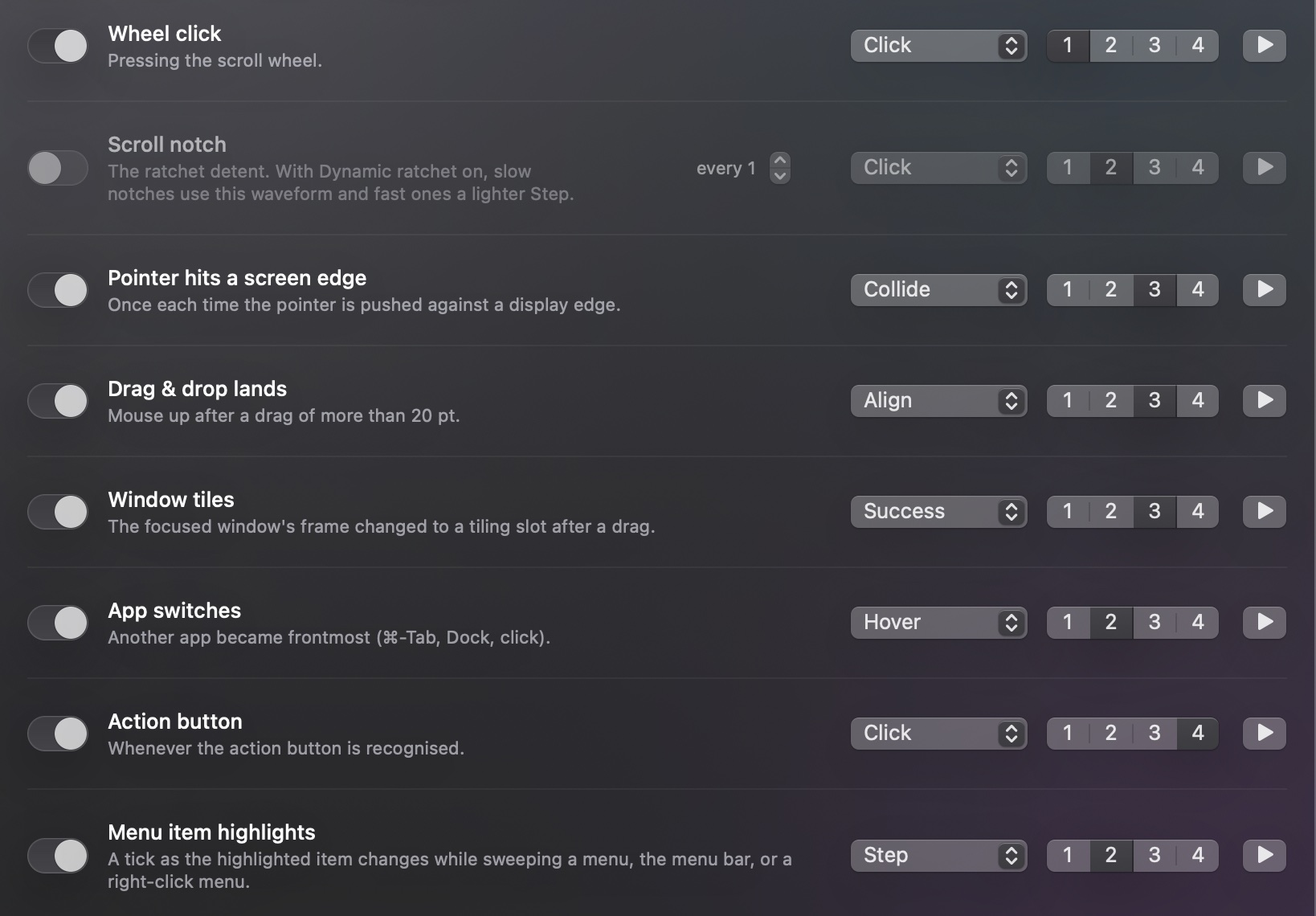
Clicks, wheel detents, menu highlights, text selection by word and by line, screen edges, drag and drop, window tiling, app switches. Each event picks its own waveform and strength.

Live mouse schematic

Action Ring

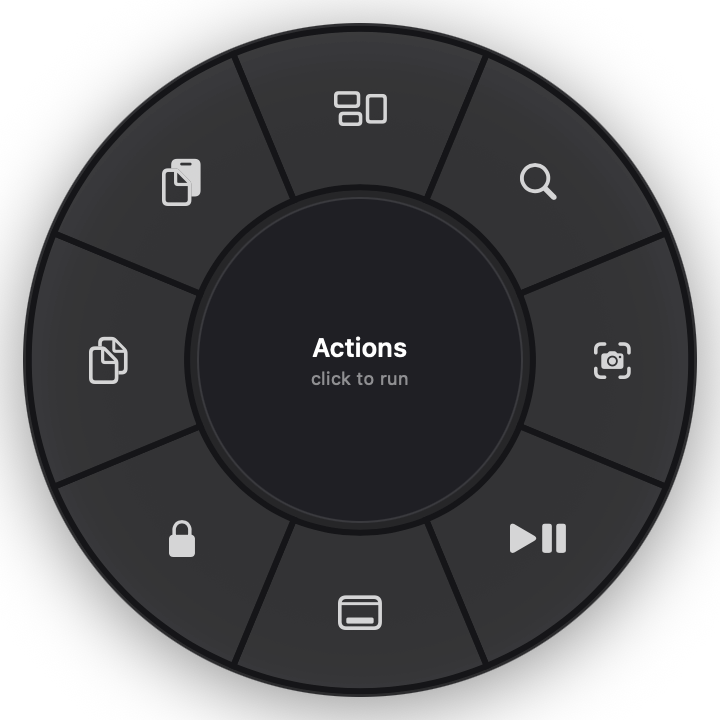
A radial menu that opens under the pointer. Sweep toward a chamber, feel a detent as you cross each one, release to run it. Up to eight chambers, all editable.

The Action Ring with eight chambers

Scrolling with momentum

A slow notch settles crisply. A flick accelerates and coasts. Detents go firm, light or silent with the wheel's speed, and free-spin on a flick.

Force click

Press and hold the left button for Look Up and link previews, with a pulse the moment it engages. Just like a Force Touch trackpad.

Action button, remapped

Press, double-press and hold each run what you choose. Hold and move the mouse for volume, brightness, tracks and desktops while the pointer stays put.

Haptics

A pulse for every moment that deserves one.

Each rule has its own waveform, strength and a play button to hear it. Feel presets set a whole button or the wheel in one pick, and a rule can carry a second pulse, a swell under a long press, or a faint texture while the wheel free-spins.

  • Clicks and releases, wheel click, scroll detents
  • Menu and context-menu highlights, text selection by word and by line
  • Screen edges, drag and drop, window tiling, app switches
Haptic rules with waveform and strength per event
Action button

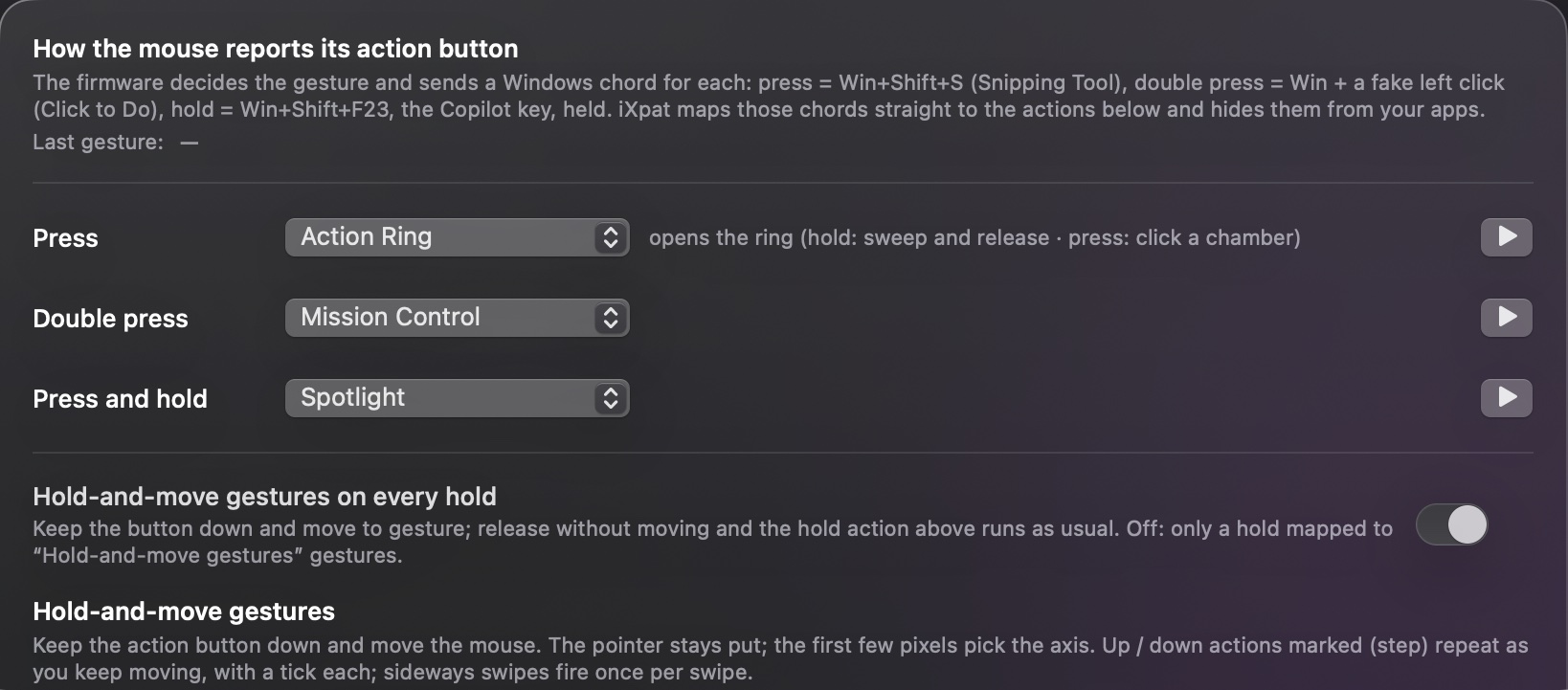
Three gestures. Any action.

The mouse's firmware sends a Windows shortcut for each gesture. iXpat recognises them, hides them from your apps, and maps press, double-press and hold to the Action Ring, Mission Control, Spotlight, a screenshot, lock, media keys, an app, a shortcut or a shell command.

  • Hold-and-move gestures with a tick per step and a bump at the end of the range
  • Test each mapping with one click
Action Button tab with press, double press and hold mappings
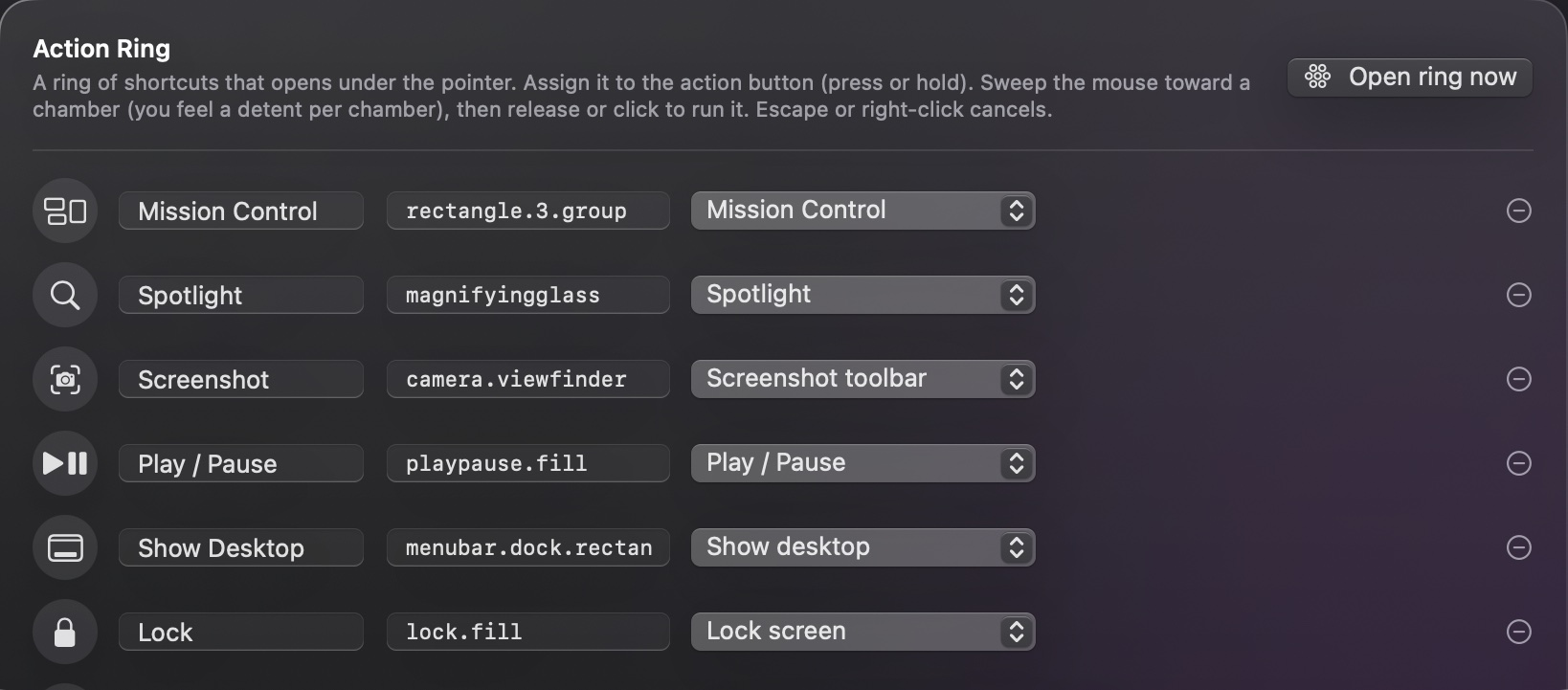
Action Ring

Your shortcuts, in a circle.

Assign the ring to the action button. Hold and sweep, or press and click a chamber. Every chamber has a name, a symbol and an action, and crossing from one to the next is a detent you can feel.

  • Up to eight chambers, reorderable
  • Escape or right-click cancels
  • Per-app rings for the apps that want their own
The Action Ring
Action Ring editor
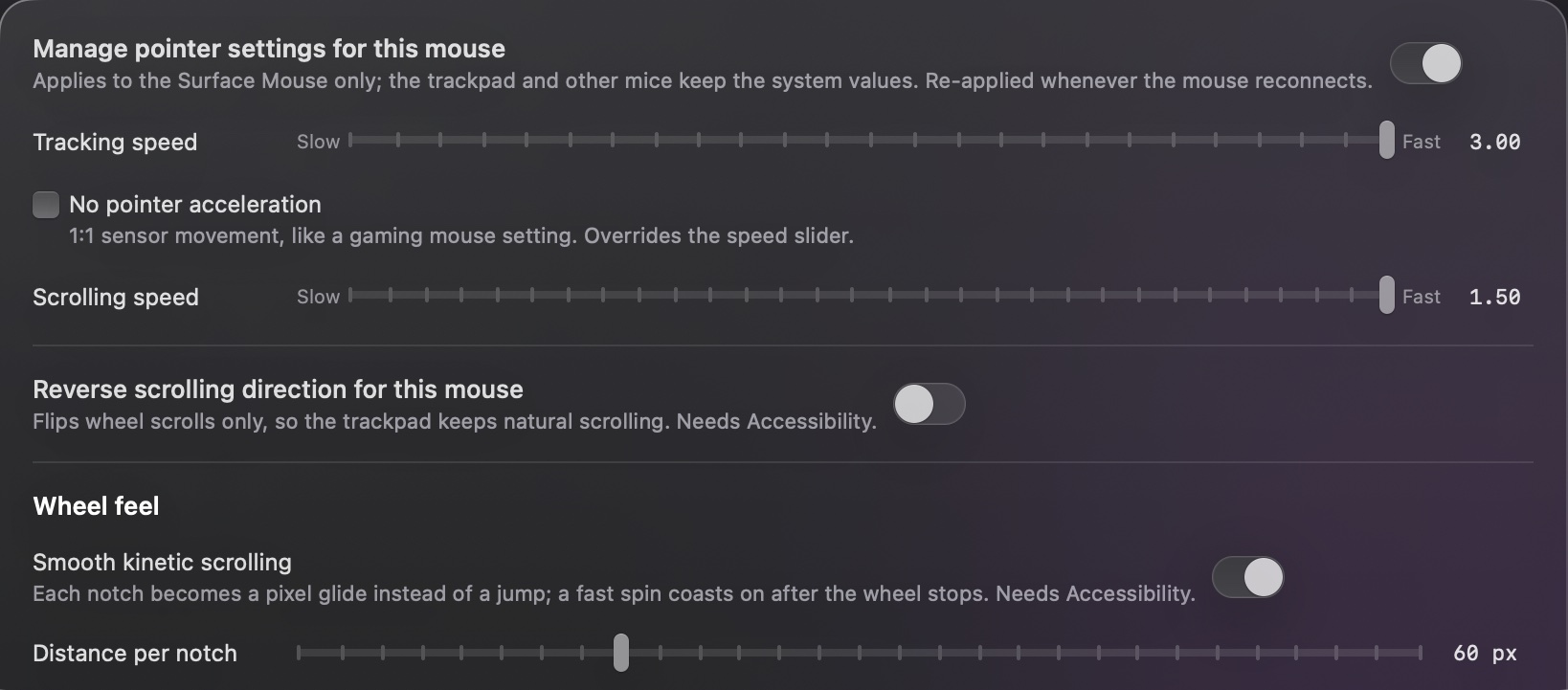
Pointer & Scroll

Settings that apply to this mouse only.

Tracking speed, acceleration, scrolling speed and direction for the Surface Mouse, while the trackpad keeps the system values. Smooth kinetic scrolling turns each notch into a glide with momentum and acceleration you can dial in.

  • Dynamic ratchet: firm when slow, light when fast, a bump on reverse
  • Free-spin on a flick, a soft pulse when the ratchet re-engages
  • Re-applied every time the mouse reconnects
Pointer and Scroll tab
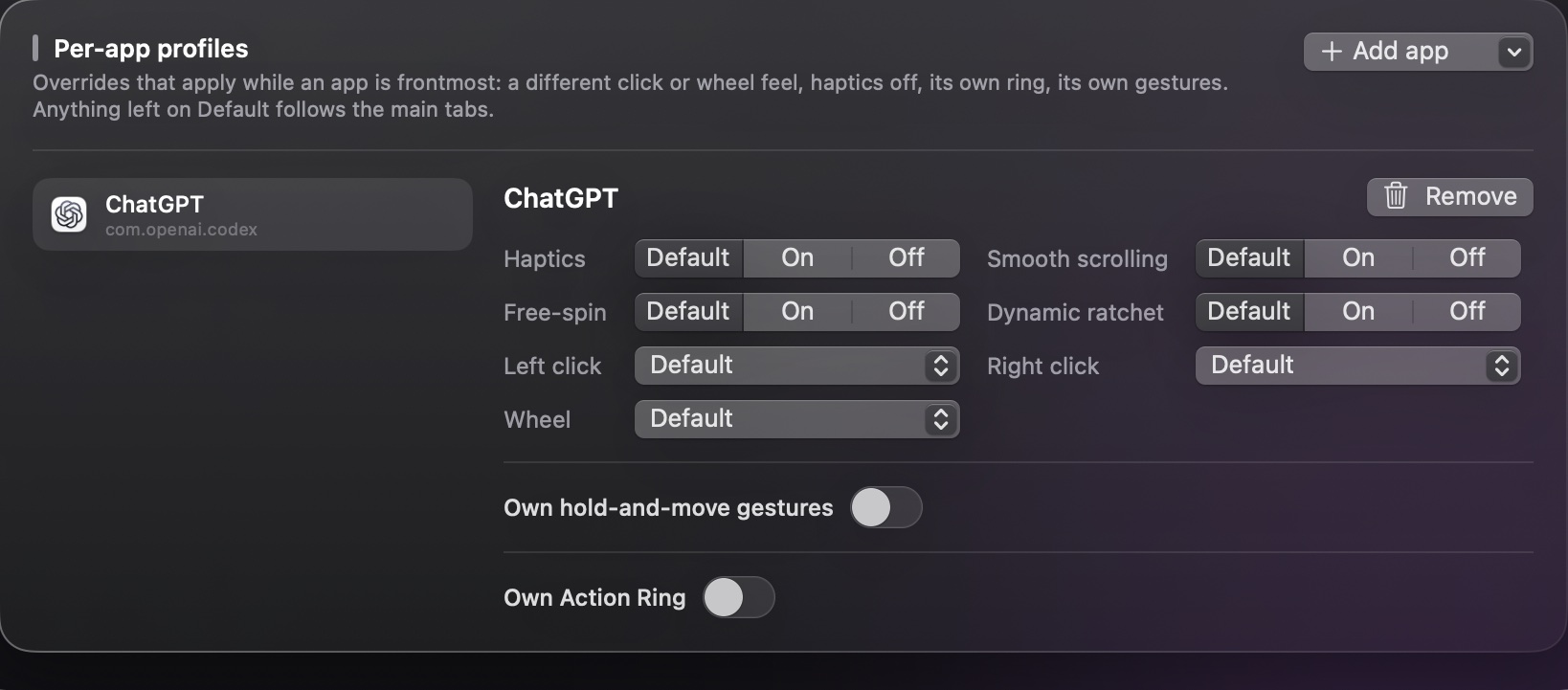
Per-app profiles

Every app, its own feel.

Override haptics, click and wheel feel, smooth scrolling, free-spin, the ring and the gestures for any app while it is frontmost. Everything left on Default follows the main tabs.

  • A loopback bridge lets app plugins request a pulse by name
  • Sample Photoshop plugin included
Per-app profiles tab
Under the hood

No driver. No kernel extension. No private framework.

Standard HID, user space

The mouse exposes a Simple Haptic Controller over HID. iXpat talks to it through IOKit, the same way any user-space app may.

Only this mouse

Every setting keys on the Surface Mouse's own device identity. Your trackpad, other mice and the rest of the system are untouched.

Open source

Swift, SwiftUI and AppKit. Read it, build it, change it. A plan for a Windows counterpart lives in the repo.

No permissionHaptic playback, test buttons, the waveform table, pointer settings
Input MonitoringReading the mouse's own reports: clicks, wheel and the action button
AccessibilityKinetic and reversed scrolling, hiding the button's shortcut, menu and selection ticks
Get started

Pair the mouse. Then pair it with iXpat.

Four steps from the box to haptics. The mouse talks plain Bluetooth, so no Surface app and no Windows PC are involved.

1 Pair the mouse over Bluetooth

Put in the two AAA batteries, then hold the power and pairing button on the underside until the light starts pulsing.

On the Mac open System Settings → Bluetooth, wait for Surface Mouse to appear and click Connect. The light stops pulsing once it is paired.

Already paired to a PC? Remove it there first, or the mouse keeps reconnecting to it.
2 Install iXpat

Download the DMG, open it and drag iXpat to Applications. Or from a terminal: brew install knightynite/ixpat/ixpat.

Launch it. It lives in the menu bar; there is no Dock icon.

macOS 14 or later. Notarized by Apple, so Gatekeeper opens it without a warning.
3 Grant two permissions

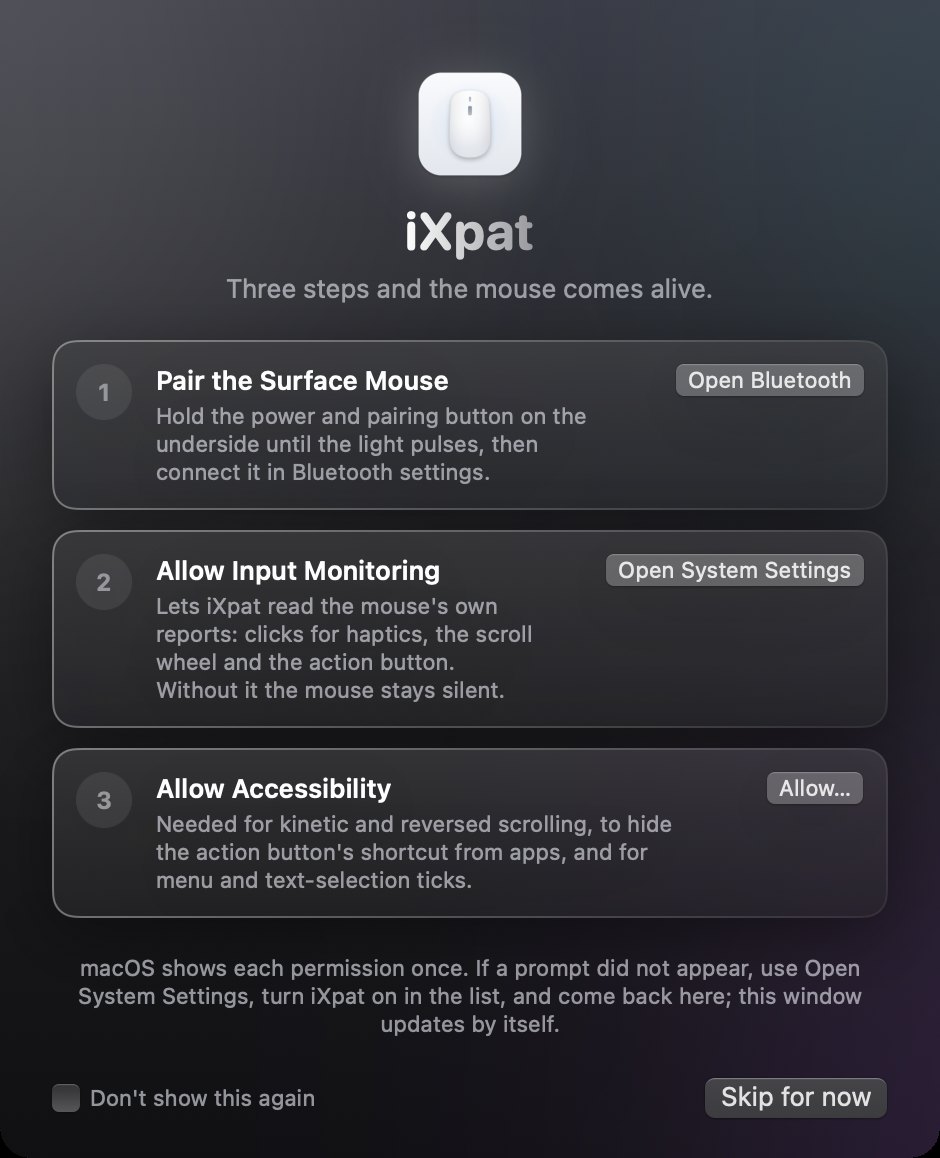
On first launch iXpat opens a setup guide with a button for each: Input Monitoring to read the mouse's clicks and wheel, and Accessibility for kinetic scrolling and the menu and selection ticks.

Both live under System Settings → Privacy & Security. The guide ticks each one off as you turn it on.

Without them the app looks installed but stays silent. Reopen the guide any time from the menu.
4 Click something

The schematic in the settings window lights up as the mouse reports events, and the first click brings the first pulse.

Pick a strength, choose a feel preset for each button, map the action button, and build your Action Ring.

Everything is per app if you want it to be. See the Apps tab.
iXpat's first-run setup guide: pair the mouse, allow Input Monitoring, allow Accessibility
In the app

The guide does the walking.

The first time iXpat opens it shows this window. Each step has its own button, the status updates by itself as you grant things, and nothing else appears until you are through. If a permission is ever missing later, the guide comes back on launch and the menu shows a warning that opens it.

Questions

Surface Mouse (2nd Edition) on a Mac

Does the Microsoft Surface Mouse (2nd Edition) work with a Mac?

Yes. It pairs over plain Bluetooth and macOS drives the pointer, the buttons and the wheel out of the box. What macOS does not do is play the haptics or understand the action button. iXpat adds both, plus the rest of what is on this page.

Do the haptics work on macOS?

With iXpat, yes. The mouse exposes a standard HID haptic controller with eight waveforms. iXpat plays them from user space for clicks, scroll detents, menu highlights, text selection, window tiling and more, at the strength you choose. Without iXpat the mouse is silent on a Mac.

Can I remap the action button on macOS?

Yes. The button sends Windows shortcuts that mean nothing on a Mac. iXpat catches them, hides them from your apps, and maps press, double press and hold to Mission Control, Spotlight, a screenshot, the Action Ring, media keys, an app, a shortcut or a shell command.

Do I need the Surface app, Mouse and Keyboard Center, or a Windows PC?

No. Nothing on this page involves Windows. Pair the mouse with the Mac, install iXpat, and every setting lives in iXpat. The only Windows-side thing iXpat cannot replace today is a firmware update, which Microsoft has not yet published for this model.

Does iXpat work with the original Surface Mouse or other Surface mice?

No. iXpat is written for the 2nd Edition only (USB vendor 045E, product 0880). Older Surface mice have no haptic controller, so there is nothing for it to drive. Other mice and the trackpad are left alone.

Does it work on Intel Macs and older macOS versions?

iXpat needs macOS 14 Sonoma or later. The download is a universal build; Apple Silicon is tested, Intel is included but untested so far.

Is it free?

Yes. iXpat is free and open source under the MIT license. The code, the issues and the releases are on GitHub.
Get iXpat

Free, open source, for macOS 14 and later on Apple Silicon and Intel Macs.
Open the DMG, drag to Applications, launch from the menu bar.

v0.1.1 · 2.9 MB
$brew install knightynite/ixpat/ixpat
$git clone https://github.com/knightynite/ixpat.git && cd ixpat && ./build.sh